August 26, 2025
Claude Code from your phone
My problem on this one was super simple: I wanted to be able to work on some projects or quick things quickly while on the go.
I use Claude Code a lot, and really wanted to be able to use it while on the go, from my phone.
This is what this setup is all about, and more.
Context
In this article, we will explore a workflow I set up in order to be able to:
- Ask Claude Code to edit stuff on my projects
- He should open a PR for each change
- Have a Telegram bot notify me when a PR is opened
- Review & merge that PR on GitHub mobile
(There's a demo video of the full flow in the original newsletter post.)
What We're Building:
- Claude Code project manipulation from mobile devices
- Automated PR creation for each AI-generated change
- Telegram notification system for instant PR awareness
- Mobile-optimized code review and merge workflows
Let's set this up
Step 1: Spin up a VPS
Create a small VPS (Virtual Private Server) with the provider of your choice.
I used Hetzner because their prices were extremely good (4.99$ /month), but you can use whatever VPS provider you like the most (DigitalOcean, …)
I also went for Ubuntu as my operating system on my VPS.
Step 2: Setup your VPS
ssh into your VPS and install some must have
ssh root@your-vps-ip

# Essential updates
apt update && apt upgrade -y
apt install git curl nodejs npm tmux nginx -y

# Verify Node 18+
node -v
Step 3: Git auth
Generate SSH key on VPS:
ssh-keygen -t ed25519 -C "your_email@example.com"
eval "$(ssh-agent -s)"
ssh-add ~/.ssh/id_ed25519

# Copy this to GitHub SSH keys
cat ~/.ssh/id_ed25519.pub
From there you can clone the repo of your choice to start to work on it
git clone git@github.com:username/repo.git
cd repo
Step 4: Install Claude Code
# Global install (no sudo)
npm install -g @anthropic-ai/claude-code

# Authenticate
claude login
# Follow OAuth flow

# Test installation
claude doctor
From here, you can already ssh from your phone and have Claude Code work on your projects, which is awesome.
(Optional) Step 5: Create Claude Code subagents
I like working with Claude Code subagents.
I highly recommend creating a small PR creator subagent to create and write PRs on your project.
Here is an example:
# PR Expert Agent

You are a PR expert. Your job is to:
- Create detailed pull requests with clear descriptions
- Follow conventional commit standards
- Include testing instructions
- Add relevant labels and reviewers

When creating PRs:
1. Write descriptive titles
2. Include "What changed" and "Why"
3. Add testing steps
4. Tag breaking changes
Step 6: n8n + Telegram bot
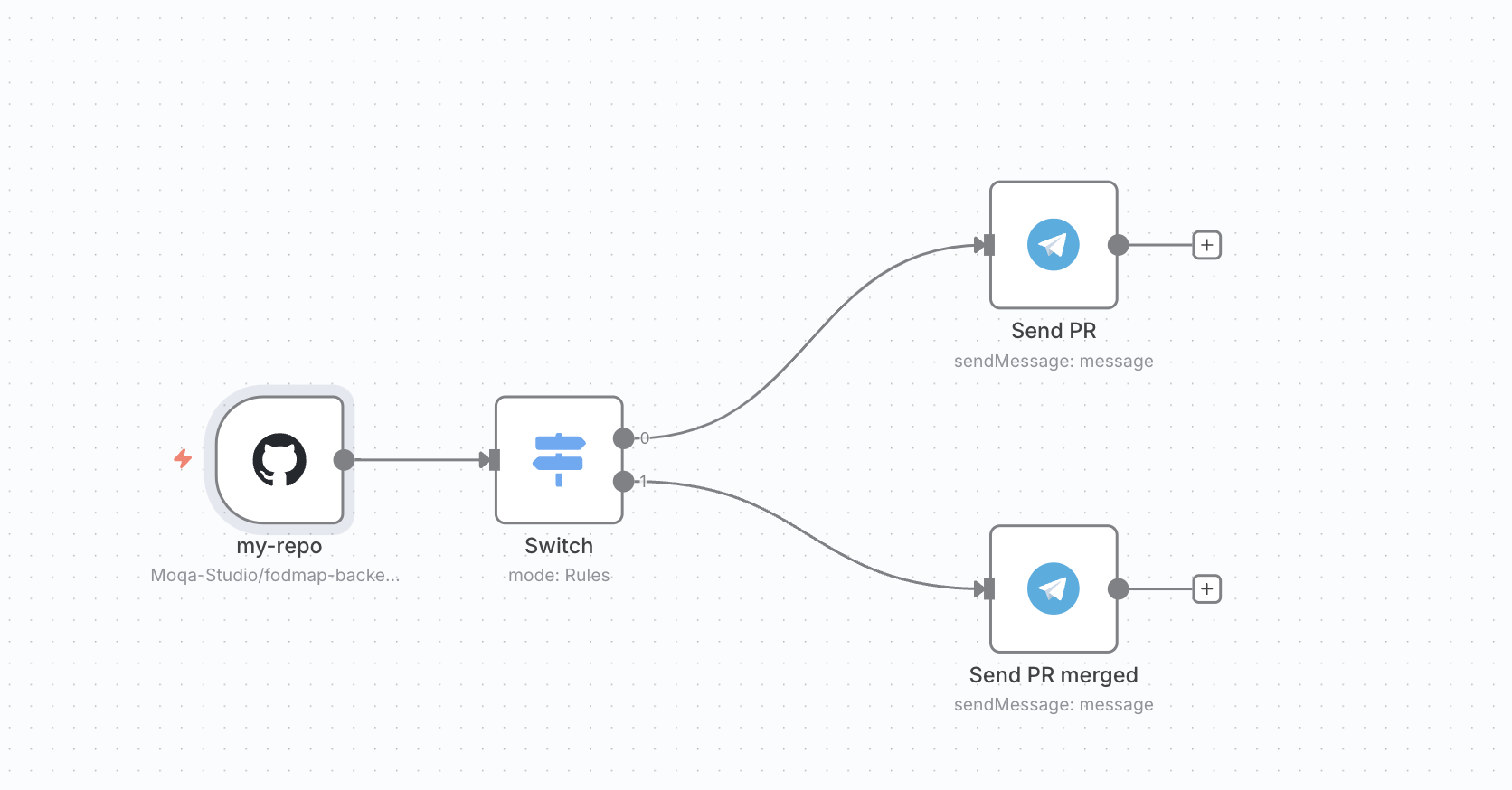
I created a short n8n flow in order to have a Telegram bot notify me whenever I have a new PR on one of my projects.
Here is what it looks like
There is:
- A GitHub trigger node on PR creation (you have to setup one for each of your projects)
- A switch that is going to look at the action (PR opened / closed)
- Two Telegram message nodes that will send a message depending the context
- PR opened with the link and some details
- PR merged
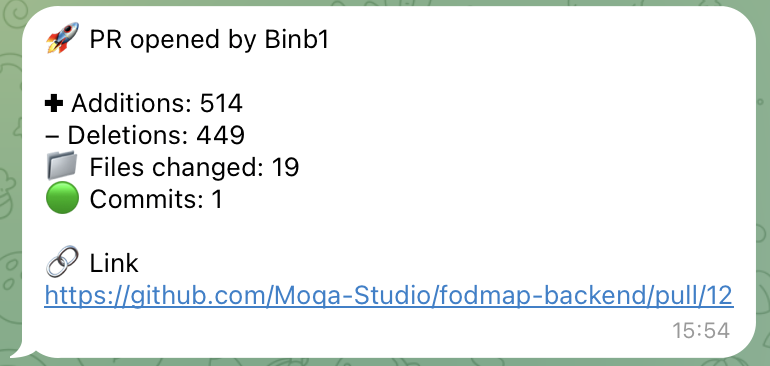
In order to set the Telegram nodes, you will need to create a Telegram bot using father-bot (super simple)
Step 7: Enjoy your flow
From there, clicking on the PR link will open GitHub mobile on your phone.
You can review the code and merge the PR accordingly !
Conclusion
I'm a big fan of this flow and use it daily at the moment.
Will probably keep upgrading it in the coming weeks !